
Save Time and Money with the Fanatical Browser Extension
Get instant price comparisons, deal alerts, coupon savings, and quick product insights — all while you browse your favorite stores.

4.7 out of 5
on Chrome Web
10,000+
Users
Secure, Minimal
Permissions
 View on Chrome Web Store
Chrome Browser is required for this extension.
How It Works
1
Browse Any Supported Site
See game pages on Steam or other supported retailers as normal.
![[object Object]](https://fanatical.imgix.net/assets/features/browser-extension/steam-product-page.png?auto=compress,format&w=360&fit=max)
2
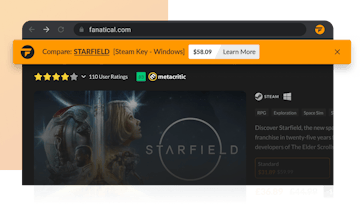
Extension Compares Prices Automatically
A bar appears showing if Fanatical has a better price. See coupons, exclusive deals, or lower prices without leaving the page..
![[object Object]](https://fanatical.imgix.net/assets/features/browser-extension/steam-product-page-topper.png?auto=compress,format&w=360&fit=max)
3
Apply Savings in One Click
Add your chosen game directly to your Fanatical cart from the Extension.
![[object Object]](https://fanatical.imgix.net/assets/features/browser-extension/steam-product-page-topper-dropdown.png?auto=compress,format&w=360&fit=max)
Product Notifications
Get notified instantly when a game you’re viewing is cheaper on Fanatical. The extension automatically finds and applies the best available coupons on Fanatical.

Automatic Coupon Savings
The extension automatically finds and applies the best available coupons on Fanatical — no searching needed. It also highlights cheaper Fanatical prices instantly when you're viewing games on other stores.

Customize your Experience
Choose where and when price comparisons appear. Turn notifications on or off for specific stores, adjust triggers, and tailor the extension so it works exactly how you want.

Exclusive Offers
Access special coupon codes and promotions available only to extension users. Save even more with deals you won’t find anywhere else.

Instant Access to Game Deals
Open the extension at any time to browse top deals, new releases, and personalised recommendations — without leaving the page you’re on.
Ready to Start Saving?
View on Chrome Web StoreChrome Browser is required for this extension.